Scandit SDK Showcase
Scandit AG.Libraries & Demo
3.981.00 Reviews
- Version
- 8.7.1
- Installs
- 500.00K
- Age Rating
- Everyone
Screenshots
Our Review of Scandit SDK Showcase
 Analysis by Appyee
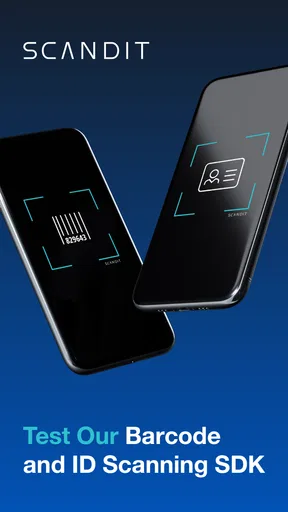
Scandit SDK Showcase is a specialist Android app rather than a general-purpose barcode reader. I see it as a practical demonstration space for evaluating Scandit AG’s scanning technology, with the emphasis on showing how barcode and ID recognition can behave in real use. That distinction matters: if you simply want to scan a product in a shop, this is probably more than you need. If you are exploring scanning tools for an app, testing recognition behavior, or trying to understand what a professional scanning SDK can offer, it becomes much more interesting.
The app sits in the Libraries & Demo category, is free to install, and is suitable for everyone. Its store summary describes the central purpose clearly: it lets users evaluate the performance of Scandit’s barcode and ID scanning SDK. I spent time looking at it from that angle, not as a consumer utility, and the experience makes more sense when treated as a hands-on showcase rather than a finished business application.
A focused demonstration rather than an everyday scanner
The first thing I would tell a friend is not to judge this app by the standards of a shopping scanner. Ordinary scanner apps are usually designed around one quick action: point the camera at a code and receive a result. A showcase app has a different job. It needs to make scanning technology visible, give prospective developers a way to try it, and help technical teams decide whether the underlying approach deserves further investigation.
That focus gives the app a useful clarity. Instead of pretending to be a complete inventory system, checkout tool, travel wallet, or document manager, it keeps attention on recognition. When I use an app like this, I am less interested in saving a scanned item permanently and more interested in questions such as how quickly the camera reacts, how easily it finds a code, and whether the experience feels dependable enough to justify deeper development work.
That makes the product especially relevant for people who are comparing scanning technologies. A developer can approach it with a test list, try representative barcodes or identification documents, and think about how the interaction might translate into a future app. A product manager can use it to understand the difference between “the camera can read this code once” and “the scanning experience is comfortable enough for repeated operational use.” Those are very different standards, and a demonstration app is valuable when it helps expose that difference.
The application has been available since January 24, 2014, and the current version is 8.6.0. It supports Android 7.0 and later, which gives it a broad compatibility range for users working with older devices as well as newer phones. I would still treat device testing as essential, because camera quality, focus behavior, screen brightness, and handling comfort can affect scanning impressions even when the software itself is unchanged.
What makes the showcase useful in practice
Its strongest quality is that it encourages evaluation through direct interaction. Reading a description of an SDK tells me very little about the moment-to-moment experience. Holding a phone over a code tells me much more. I can see whether I need to line up the target carefully, whether movement causes frustration, and whether the app feels forgiving when the code is small, angled, reflective, or surrounded by visual clutter.
This is where the app can save time for a development team. Before writing a proof of concept, someone can use the showcase to form a realistic opinion about the scanning workflow. That does not replace integration work, but it can prevent a team from spending days building around assumptions that a short hands-on session would have challenged.
A useful testing habit is to avoid trying only clean, large codes on a bright desk. I would test packaging, labels, screens, curved surfaces, and codes viewed at ordinary arm’s length. I would also repeat the same scan after moving the phone away and bringing it back. The point is not to create a laboratory score; it is to discover whether recognition feels natural during the kind of work the eventual app will support.
Another non-obvious benefit is that the showcase can help separate recognition problems from workflow problems. If a code reads correctly but the camera interaction feels awkward, the issue may be the surrounding interface rather than the scanning engine. Conversely, if the code is difficult to acquire even when the interface is simple, that is important information before a developer commits to a particular technical direction. I find this distinction more useful than a simple “works” or “doesn’t work” judgment.
Why the developer audience will get the most from it
Scandit AG is the developer behind the app, so the showcase naturally speaks to people evaluating Scandit’s own scanning approach. That makes the app more relevant to software teams than to casual phone users. It is a window into the kind of experience a business might build into retail, logistics, identification, field service, or other workflows where camera-based recognition is part of a larger process.
For a developer, I would use the app early in a project, before debating interface details or writing extensive camera code. The best sequence is simple: define the real scanning conditions, try those conditions in the showcase, note where the experience feels strong or weak, and then decide whether a deeper SDK evaluation is worthwhile. This avoids treating a polished demonstration as proof that every future use case will behave identically.
For a nontechnical decision-maker, the app has a different role. It can make a technical conversation more concrete. Instead of hearing abstract claims about recognition quality, a manager can try a few examples and ask better questions about deployment, device coverage, user training, and the surrounding workflow. The showcase cannot answer every business question, but it can make the initial discussion much less theoretical.
I would not recommend installing it just because you want a convenient barcode history or a way to compare product prices. Those are normal reasons to choose a consumer scanner, and this app is not positioned around them. Its value comes from evaluation, not from becoming a daily personal utility.
How it compares with ordinary barcode apps
Compared with the usual free barcode readers, Scandit SDK Showcase feels more purposeful and less consumer-oriented. A typical reader is judged by convenience: open it, scan a code, see a result, and move on. The showcase is judged by how well it demonstrates a scanning experience that could sit inside another application.
That difference creates a trade-off. A consumer app may be better if I care about product information, saved scans, sharing results, or a familiar one-button workflow. The showcase is better when I care about examining the act of scanning itself. It is closer to a test bench than a personal organizer.
It also compares differently with the camera app already installed on a phone. A built-in camera may recognize common codes without requiring another download, but it usually does not give a developer the same focused context for evaluating SDK-driven scanning. On the other hand, the built-in camera is often the more sensible choice for a one-off personal scan. Installing a specialist demonstration for that purpose would be unnecessary friction.
There is also a difference between this app and a complete enterprise scanning solution. A showcase can demonstrate the front end of recognition, while a real business product may need authentication, databases, offline behavior, audit trails, device management, data validation, and custom error handling. I would never treat a successful demonstration scan as evidence that the entire operational system is solved. It is a starting point for technical judgment, not a replacement for product design.
The limitations I would consider before relying on it
The main limitation is narrow purpose. Because the app is built to showcase scanning technology, it may feel incomplete to anyone expecting a fully featured tool. That is not necessarily a defect, but it can be disappointing if the store description is read as a promise of a finished scanner for everyday tasks.
Another limitation is that a demonstration cannot represent every environment. A phone held in a quiet test session is not the same as a device used by a warehouse worker wearing gloves, a cashier moving quickly, or a field employee working outdoors. Lighting, camera placement, user posture, code condition, and the design of the surrounding workflow all matter. I would use the app to identify promising behavior, then validate the important scenarios on the actual devices and materials involved.
There is a practical evaluation trap here: people often test only the easiest examples. If the app reads a large, high-contrast code instantly, that is encouraging but not decisive. I would deliberately include damaged packaging, glossy labels, low contrast, unusual angles, and codes displayed on another screen. I would also test whether users understand what to do without being coached. A technically capable scanner can still produce a poor product if the interaction is unclear.
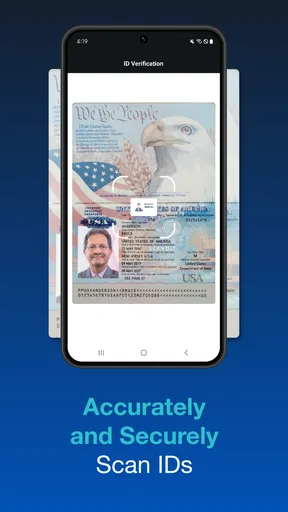
The app’s age rating of Everyone makes it approachable for broad testing groups, but that does not make every scanning project suitable for every user. Identification workflows can involve sensitive real-world contexts, and a team still needs to think carefully about consent, data handling, and the design of any application built after the demonstration. I see the rating as a sign of general accessibility, not as a substitute for responsible implementation.
One more limitation is that the showcase is not the final word on performance. A demonstration can help me decide whether to investigate an SDK, but it cannot tell me how integration will affect my own interface, backend, support process, or budget. If a project has unusual recognition requirements, I would ask for a technical evaluation path rather than making a major decision from a short app session.
Practical ways to evaluate it intelligently
If I were assessing the app for a small development team, I would begin with a written list of scanning situations instead of opening it casually. I would include the codes and documents the planned product must handle, the approximate distance users will hold the phone, and the lighting conditions expected in the field. This produces more useful observations than a vague impression formed from one successful scan.
I would then compare three things separately: acquisition speed, user effort, and recovery after failure. A scanner that reads quickly but forces users into a precise position may not be ideal for a fast workflow. A scanner that takes slightly longer but is easy to aim could be preferable in practice. Recovery matters too: when a scan fails, can the user understand what to change, or do they simply keep moving the phone without guidance?
A second useful workflow is to test with several people who have not been shown the “correct” technique. Watch where they place the phone, how long they wait, and whether they know when recognition has completed. This reveals usability issues that a developer can miss after becoming familiar with the interface. For an SDK evaluation, that human behavior is just as important as the raw ability to detect a code.
I would also keep notes about the device rather than generalizing too quickly. The minimum operating system is Android 7.0, but compatibility is not the same as an identical experience across all hardware. Older phones may have different cameras, displays, and performance characteristics. If the intended audience uses a controlled fleet, those exact devices should be part of the test plan.
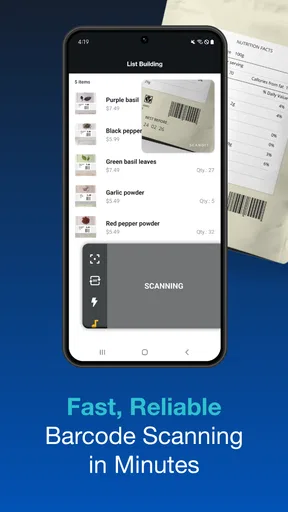
For a quick everyday scenario, imagine a small retailer deciding whether to build a stock-checking app. The owner could install the showcase on the phones staff already use, try labels on shelves and products, and observe whether workers can scan without stopping to adjust every item. If the process feels natural, the team has a reason to investigate further. If staff struggle with glare, distance, or aiming, that early discovery is equally valuable because it prevents an unrealistic promise to the business.
Who should install it, and who should skip it
I would recommend the app to Android developers, technical evaluators, solution architects, and product teams considering barcode or ID recognition. It is also useful for students or curious professionals who want to understand what a scanning SDK demonstration feels like before attempting an integration. The free price makes that initial exploration easy, especially when the goal is to decide whether further research is justified.
It is a good fit for a team that needs to compare the feel of professional scanning with the basic camera-based alternatives. It can help answer whether the interaction seems fast enough, whether difficult targets deserve closer testing, and whether a scanning-first workflow is realistic for the intended users. Those are valuable questions to answer before development becomes expensive.
I would skip it if my only goal were to scan a receipt, look up a product, store a personal list of codes, or share a result with a friend. A conventional barcode reader or the phone’s own camera will usually be more direct. I would also avoid using the showcase as the sole basis for a high-stakes identification system. In that situation, a controlled proof of concept, device testing, security review, and careful validation would be necessary.
The app’s audience is reflected in its reception: it has an average rating of 3.9 from roughly 1.7 thousand ratings, with over 500 thousand installs. Those figures suggest a meaningful audience, but I would interpret them in context. A specialist developer demonstration naturally attracts a different group from a mass-market consumer app, so the rating is best viewed as one signal rather than a complete technical verdict.
My final recommendation
After looking at what this app is trying to do, my view is straightforward: Scandit SDK Showcase is worthwhile when I need to evaluate scanning technology, and unnecessary when I simply need a barcode reader. Its strength is the focused opportunity to experience barcode and ID scanning as a possible building block for another product. That focus gives developers and decision-makers something more useful than a generic store description: a chance to test assumptions with a phone in hand.
The meaningful weakness is that the showcase can only be the beginning of an evaluation. It does not remove the need to test real devices, real materials, real users, and the complete workflow surrounding recognition. Anyone expecting inventory features or a personal scan history may also find it too specialized. I appreciate that specialization, but only when the user arrives with the right question.
For my recommendation, I would install it before committing to a Scandit-based project, especially if scanning speed, aiming effort, or difficult conditions are important. I would use a deliberate test set, involve people unfamiliar with the interface, and treat the results as evidence for the next step rather than a finished product assessment. For casual scanning, I would choose something simpler.
My bottom line is that this is a useful evaluation tool disguised as an app download, not a general-purpose scanner. If you are exploring how barcode or ID recognition could work inside a serious Android application, it deserves a place in the early research phase. If you only want to point your phone at a code and move on, the usual alternatives will serve you better.
Privacy and Permissions
See what permissions an app requests and how it handles your data.
- Location
- precise location (GPS and network-based)
- Camera
- take pictures and videos
- Other
- view network connections, pair with Bluetooth devices, access Bluetooth settings, full network access, control Near Field Communication, control vibration, prevent device from sleeping
Verdict
Strengths of Scandit SDK Showcase
- Accurate barcode scanning works well in varied lighting and camera angles.
- Supports multiple barcode formats for testing different retail and logistics scenarios.
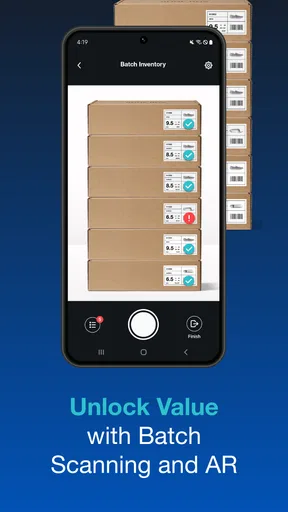
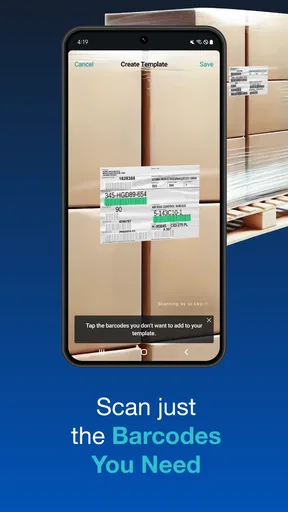
- Demonstrates advanced features such as batch scanning and text recognition.
- Interactive examples make it easier to evaluate Scandit’s enterprise capabilities.
- Useful reference for developers planning mobile scanning integrations.
Limitations of Scandit SDK Showcase
- Primarily a showcase, so it offers limited value for everyday personal use.
- Some demonstrations may require compatible devices or specific camera hardware.
- Enterprise-focused features can be difficult for beginners to understand.
- The app does not replace a complete barcode inventory or retail management solution.
- Performance and available demos may vary depending on device and operating system.
Similar Picks in This Category
View All
PGT: GFX, Launcher & Optimizer
Trilokia Inc.4.5

AusweisApp Bund
Governikus Service GmbH3.7

Cardboard
Google LLC3.2

Gamers GLTool with Game Tuner
Trilokia Inc.4.5

Multi Web Chat - Read Secretly
World Scan & Cleaner3.8

App Cloner Premium & Add-ons
App Listo1.9
Frequently Asked Questions
What is Scandit SDK Showcase used for?
Scandit SDK Showcase is a demonstration app that lets developers and business users explore Scandit’s barcode scanning and data-capture technologies. It typically includes examples for scanning barcodes, recognizing text, capturing serial numbers, and testing other retail or enterprise workflows. It is mainly intended to showcase capabilities rather than function as a complete consumer shopping or inventory application.
Can anyone use Scandit SDK Showcase, or is it intended for developers?
Anyone can install the app to test its scanning features, but the primary audience is developers, technology evaluators, and businesses considering Scandit solutions. The showcase helps users understand how fast and accurately the SDK can capture information in practical situations. Some demonstrations may require specific permissions, compatible devices, or access to features configured by Scandit.
Does Scandit SDK Showcase scan all barcode types and documents?
The app supports selected barcode formats and data-capture demonstrations provided by the Scandit SDK, but availability can vary by feature, device, operating system, and the version of the showcase. It should not be assumed that every barcode, document, or text type is supported automatically. For a precise list of supported symbologies and capabilities, users should consult Scandit’s official documentation.
What permissions does Scandit SDK Showcase require?
The most important permission is camera access, since the application uses the device camera for barcode and visual data capture. Depending on the demonstrations included in the installed version, it may request additional permissions or access to device features. You can deny permissions, but scanning functions will not work correctly without camera access. Review the permission prompts before continuing.
Is Scandit SDK Showcase free to download and use?
The showcase application is generally provided as a way to evaluate Scandit’s technology, but access and usage conditions can depend on the platform, release, and selected demonstrations. A showcase app should not be confused with a fully licensed SDK integration for production use. Businesses planning to embed Scandit into their own Android or iOS application should check Scandit’s commercial plans, trial terms, and licensing requirements.
